
Download BitTorrent Surf – Simple Chrome Torrent Client for Fast, Secure Downloads
Overview
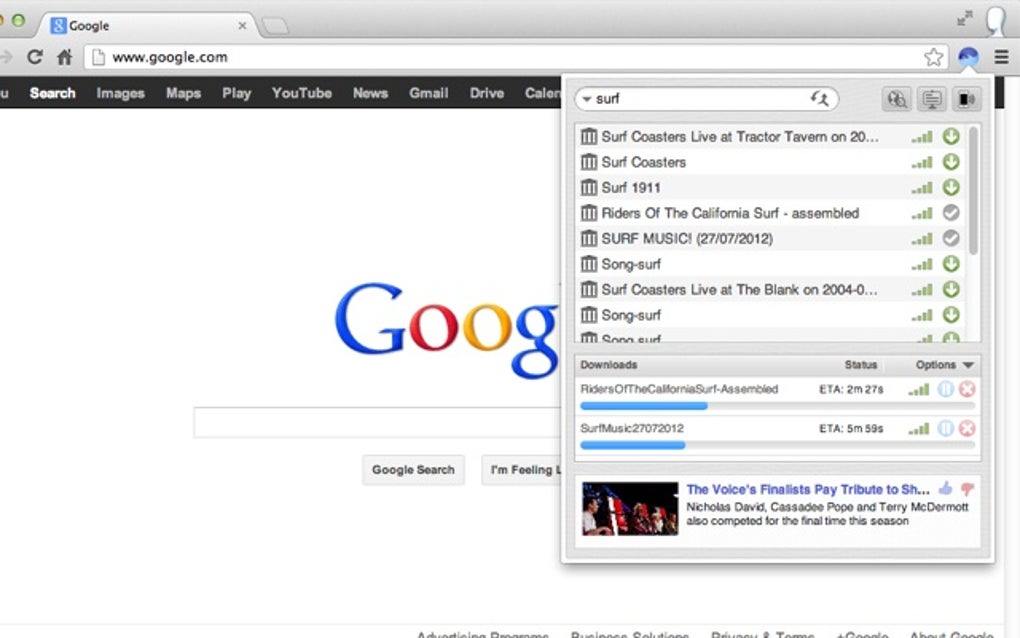
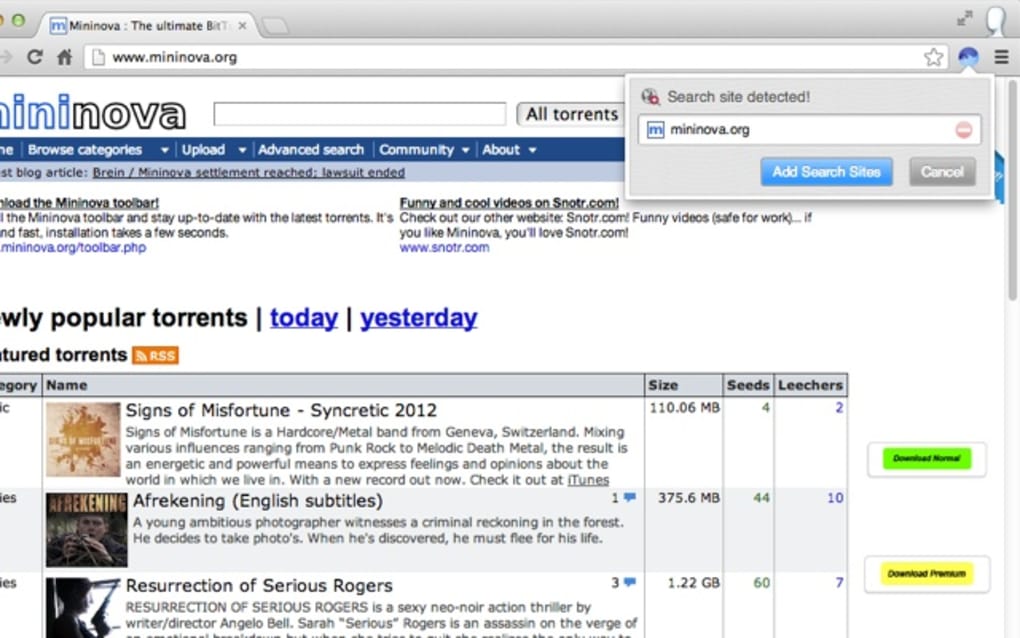
BitTorrent Surf is a lightweight, Chrome‑based BitTorrent client that brings the power of torrent searching and downloading directly into your browser. Unlike heavyweight desktop applications such as uTorrent or Vuze, BitTorrent Surf focuses on a clean, no‑frills interface that lets you start a download with a single click. After installing the extension, you can instantly search popular torrent indexes, add custom search engines, and begin downloading without leaving the Chrome tab.
The extension automatically handles the peer‑to‑peer connections, displays progress, and respects the share ratio you set for each file. While it lacks advanced bandwidth throttling, scheduling, or post‑download automation, BitTorrent Surf’s strength lies in its simplicity and immediacy—perfect for casual users who want a quick way to grab files without juggling a separate program. The only visual trade‑off is a modest banner ad at the bottom of the window, which most users find unobtrusive.
In short, BitTorrent Surf delivers a secure, easy‑to‑use torrent experience right inside Chrome, making it an ideal choice for those who prioritize speed and convenience over deep customization.
Key Features
- One‑click search and download directly from the Chrome toolbar.
- Support for multiple public torrent indexes and custom search engine integration.
- Instant download start after selecting a torrent – no external client needed.
- Simple share‑ratio control for each torrent to encourage seeding.
- Automatic handling of magnet links and .torrent files.
- Real‑time download progress bar and speed statistics.
- Lightweight footprint – minimal RAM and CPU usage compared to full‑featured clients.
- Secure HTTPS connections for index queries to protect privacy.
- Ad banner placement that does not interfere with core functionality.
- Automatic updates via Chrome Web Store for continuous security patches.
Installation & Usage Guide
Step‑by‑Step Installation
- Open Google Chrome and navigate to the Chrome Web Store.
- Search for “BitTorrent Surf” or follow the direct link from the official BitTorrent website.
- Click the Add to Chrome button, then confirm by selecting Add extension in the pop‑up dialog.
- Once installed, a small surf‑board icon appears to the right of the address bar.
- Click the icon to open the BitTorrent Surf panel; the first launch may prompt you to grant permission for download management.
How to Search and Download
After installation, the extension provides a built‑in search box. Type a keyword (e.g., “Ubuntu ISO”) and press Enter. Results from the default torrent index appear as a list showing file name, size, seeders, and leechers.
To add a custom search engine, click the gear icon, choose “Add Search Engine,” and paste the URL template provided by your preferred index. When you find the desired torrent, simply click the green check‑mark button next to it. The download begins immediately, and the progress bar updates in real time.
You can pause, resume, or cancel the download from the same panel.
Setting Share Ratio and Managing Files
BitTorrent Surf allows you to specify a share ratio for each torrent. Click the settings icon next to an active download and enter a ratio such as “1.5”. The client will continue seeding until the ratio is met, then stop automatically. While the extension does not let you choose a custom download folder, all files are saved to Chrome’s default “Downloads” directory, which you can change in Chrome’s global settings if needed.
Compatibility
BitTorrent Surf runs on any platform that supports Google Chrome, including Windows 10/11, macOS 10.14+, Linux distributions with Chrome, as well as Chrome on Android (though the extension is limited to desktop Chrome). The extension leverages Chrome’s built‑in sandbox, ensuring that torrent traffic is isolated from the rest of your system for added security.
Pros and Cons
Pros
- Ease of use: One‑click search and download without a separate program.
- Lightweight: Minimal impact on system resources.
- Instant updates: Automatically receives security patches via Chrome Web Store.
- Custom search support: Add your own torrent indexes.
- Secure connections: HTTPS queries protect your search privacy.
Cons
- Limited advanced controls – no bandwidth throttling or scheduling.
- No option to select a custom download folder directly from the extension.
- Basic post‑download handling – files remain in the default Downloads folder.
- Banner ads appear at the bottom of the interface, which may distract some users.
- Not suitable for power users who need extensive torrent management features.
Frequently Asked Questions
Is BitTorrent Surf free to use?
Yes, BitTorrent Surf is completely free. You can download the extension from the Chrome Web Store at no cost, and there are no hidden subscription fees.
Can I change the default download location?
The extension saves files to Chrome’s default “Downloads” folder. To change the location, adjust Chrome’s global download settings (chrome://settings/downloads) – BitTorrent Surf will follow that path.
Does BitTorrent Surf support magnet links?
Yes, the client can open magnet links directly from web pages. Clicking a magnet link launches the BitTorrent Surf panel and starts the download automatically.
Is my privacy protected while using the extension?
BitTorrent Surf uses HTTPS for all search queries, which encrypts the communication between your browser and the torrent index. However, like any torrent client, your IP address is visible to peers in the swarm.
Can I set a maximum upload or download speed?
No, BitTorrent Surf does not include bandwidth throttling options. It relies on your network’s natural speed limits. If you need fine‑grained control, consider a full‑featured desktop client.
Conclusion & Call to Action
BitTorrent Surf delivers exactly what its name promises – a quick, hassle‑free way to surf the torrent web without leaving Chrome. Its intuitive interface, instant search capability, and minimal system impact make it an attractive option for users who want a “download‑and‑go” solution. While power users may miss advanced settings like speed caps, custom folders, or extensive seeding controls, the extension’s simplicity is its greatest selling point. If you’re looking for a secure, free, and fast way to grab files directly from your browser, BitTorrent Surf is worth a try.
Ready to start downloading? Click the Add to Chrome button now, and enjoy torrenting without the clutter of a heavyweight client.







